


Houzz - Home Design & Remodel
4.639.47K Reviews
App Specs
- Version
- 26.8.11
- Updated On
- License
- Free
- Downloads
- 10,000,000+
- Developer
- Houzz Inc.
- Categories
- House & Home
- Platform
- Android, iOS
Screenshots
 Analysis by AppCompare
When I’m planning a change at home, the hardest part is often moving from “I like this look” to “what could actually work in my room?” Houzz - Home Design & Remodel is useful in that gap: it brings together design photos, planning tools, shopping, and ways to find local professionals. I’d treat it as a place to explore and organize possibilities, not as a substitute for measurements, a contractor’s advice, or seeing materials in person.
When a strong connection helps most
Houzz is a House & Home app from Houzz Inc., and much of its appeal is visual. Browsing project photos, opening product details, and looking through professional portfolios all work best when the app can load images and other current content. A reliable connection makes it easier to move from one idea to another without interrupting the comparison process.
That matters during a practical decision, not just casual browsing. Say I’m weighing two kitchen layouts while talking with a family member: I can search for examples, save useful images to an ideabook, and use that collection to explain what I mean. The collection gives the conversation a shared reference point, though it does not confirm that a design will fit my room or budget.
Using it in the middle of everyday life
The app suits short sessions as well as longer planning periods. I might browse bedroom ideas during a commute, save a few possibilities, then revisit them at home when I can compare them with the room itself. For decisions involving dimensions, finishes, or a professional visit, I’d wait until I can concentrate and check the details rather than relying on a quick glance at a phone screen.
Houzz is free, open to an Everyone audience, and has a 4.7 average from around 404,000 ratings. Its reach is substantial, with over 10 million installs, but those figures don’t tell me whether a particular contractor or product is right for my project. I’d use the app’s reviews and portfolios as starting points, then ask direct questions before committing.
What to do when browsing gets interrupted
Image-heavy browsing can feel less fluid when a connection is weak, and that can break the rhythm of comparing ideas. My practical workaround is to save promising finds as I go instead of assuming I’ll remember where I saw them. An ideabook can make a large search more manageable: I can separate, for example, lighting ideas from flooring references and return to the relevant group when I’m ready to make a decision.
I’d also avoid treating a saved photo as a complete plan. A beautiful renovation image may leave out the constraints that shaped it, such as room dimensions, existing plumbing, or the homeowner’s budget. Houzz helps me collect visual direction; it doesn’t remove the need to verify measurements, materials, installation requirements, and local conditions.
Worth Reading Before You Choose

Flipboard Shows What News Apps Must Do Beyond the Feed

Switching to Android Auto Means Rethinking Your Driving Routine

Google Calendar Makes a Crowded Week Easier to Manage

Ludo King Makes the Most of the Minutes Between Plans

Baby Panda World Brings Quick Play to Modern Phones, but Its Game Library Feels Busy

ESPN’s Live Game View Makes Following Close Games Easier
Keeping a project organized without overloading your phone time
For a data-conscious workflow, I’d browse with a specific question in mind rather than endlessly loading images. Searching by room or style, then saving only the examples that explain a decision, keeps the ideabook useful and cuts down on repeat searching. If I’m comparing products, I’d note the details that matter to me—such as material, dimensions, and price—so I can assess them calmly instead of reopening the same pages several times.
The current version is 26.5.28, and it supports devices running Android 6.0 or later. I’d still check that the app is suitable for my particular device before starting a project workflow. People who want a dedicated renovation calculator, a technical floor-plan tool, or an offline-first reference library may be better served by a specialized alternative; Houzz is strongest when the job is visual discovery and organizing a conversation.
Discovering Inspiration
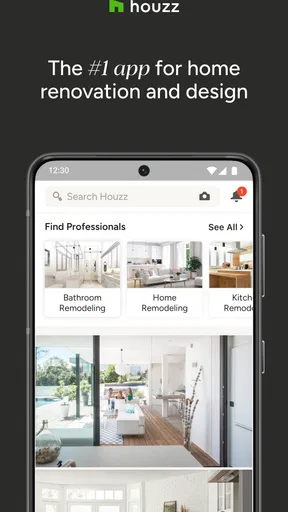
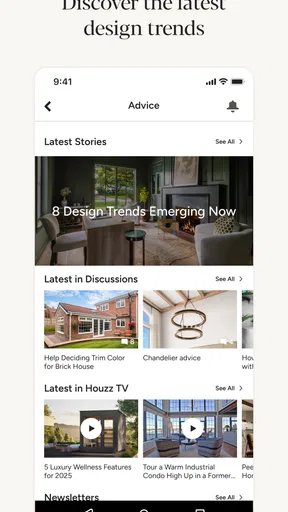
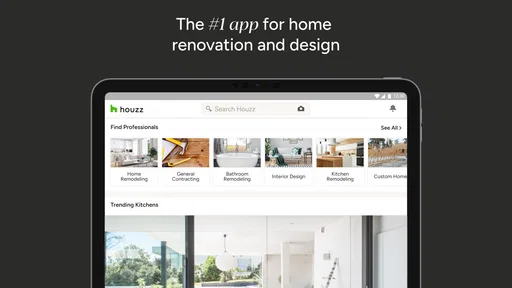
Imagine Pinterest, but exclusively for home design. That's the vibe you get when you first open Houzz. The app is packed with millions of photos from real projects, all beautifully curated and ready to give you that spark of inspiration. Whether you're planning a full-scale renovation or just looking to spruce up a corner of your bedroom, Houzz has you covered with a plethora of ideas.
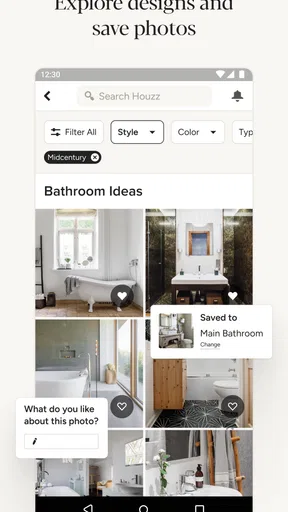
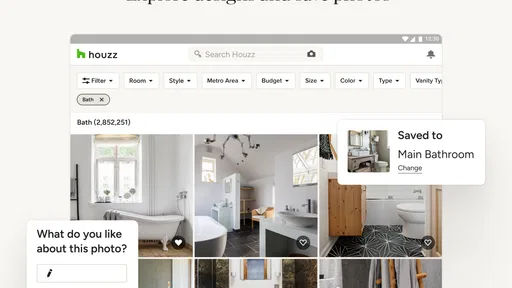
One of the coolest features here is the ability to filter photos by style, room, and even location. So, if you're obsessed with modern farmhouse kitchens or dreamy coastal bedrooms, you can narrow down your options and find exactly what you're looking for. It’s a visual feast that’s super easy to navigate.
Planning Your Dream Space
Once you've soaked in all the inspiration, it's time to put those ideas into action. Houzz offers a nifty tool called the "Sketch" feature. This lets you take a photo of your current space and then doodle all over it with potential changes. Add furniture, change colors, and experiment without any real-world commitment. It's like redecorating without the heavy lifting.
If you’re more into meticulous planning, the app offers detailed product information and user reviews. You can compare prices, materials, and see how items will look in your room before making any purchases. It's an excellent way to visualize your dream space coming together.
Shopping and Professional Help
Feeling overwhelmed by all the choices? That's where Houzz's shopping feature comes into play. With thousands of products available directly through the app, you can shop for furniture, fixtures, and decor pieces right from your phone. And the best part? Many items come with a nifty "View in My Room" feature that uses augmented reality to show exactly how that chic sofa will look next to your coffee table.
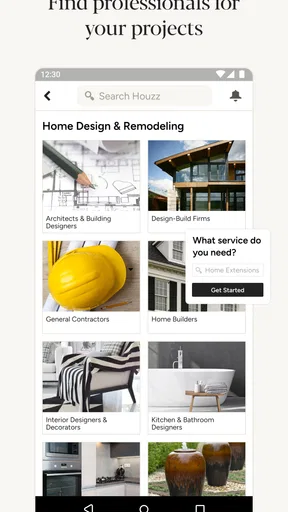
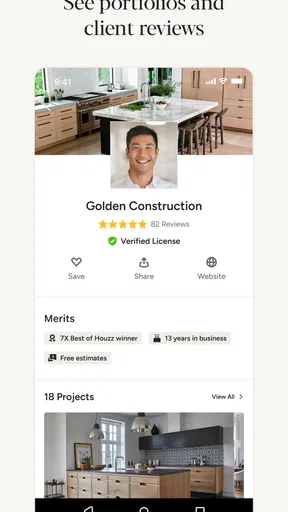
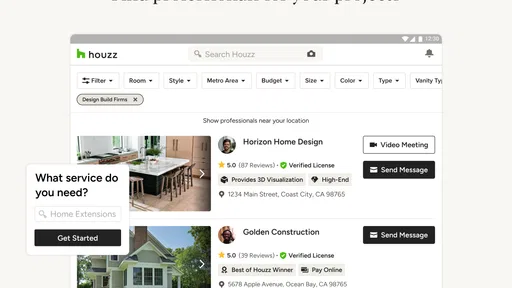
Need more than just shopping advice? Houzz connects you with professionals in your area, from architects to contractors. You can browse through their portfolios, read reviews, and even contact them directly through the app. It’s like having a team of home improvement experts at your fingertips.
The Community Vibe
One of the standout features of Houzz is its community aspect. The app isn’t just a tool; it's a place to interact with other design enthusiasts. You can join discussions, ask questions about specific projects, and even share your own renovation journey. It's an inclusive space where you can get feedback, tips, and encouragement from fellow users.
The sharing feature also allows you to create ideabooks, which are essentially collections of your favorite photos, products, and notes. These can be shared with friends, family, or even your contractor to ensure everyone is on the same page.
From browsing to a decision you can use
I find Houzz most helpful when I turn a vague preference into a brief someone else can understand. Instead of telling a contractor “I want a brighter kitchen,” I can collect examples that show whether I mean lighter cabinets, more natural light, or a different backsplash. That distinction can save time in a first conversation and help expose disagreements early, before they become purchases or construction work.
A useful habit is to save examples for different reasons rather than treating every attractive room as a candidate design. One image might show a color palette, another a storage idea, and a third the shape of a light fixture. Keeping those purposes clear makes an ideabook less like a scrapbook and more like a working reference. I’d add a short note explaining what I want to borrow from each image, especially if the rest of its style is not right for my home.
Sketch and augmented-reality viewing are best treated as ways to test a direction, not as proof of fit. A visual overlay can help answer “does this general style feel right here?” but it cannot replace checking the item’s dimensions or the room’s clearances. Before buying a sofa, for example, I’d measure doorways and walking paths as well as the space where it will sit. A screen preview is helpful for imagination; a tape measure is still more dependable for the practical decision.
Choosing between Houzz and narrower tools
Compared with a general image-saving app, Houzz keeps the search focused on homes and connects visual inspiration to products and professionals. That makes it convenient when I want to go from a room photo to a possible item or a conversation with someone who works locally. A general social platform may offer broader tastes and more casual ideas, but it can take more effort to sort inspiration from content that is not useful for an actual home project.
The trade-off is breadth within a specific purpose rather than depth in every planning task. Someone drawing a precise floor plan, estimating quantities, or managing a construction schedule may prefer a dedicated tool for that job. I would not expect a photo-led design app to settle technical questions about electrical work, structural changes, or installation. For a small refresh, Houzz can be enough to clarify taste and shortlist products; for a major renovation, I’d pair it with professional assessment and tools built for the technical details.
Making professional searches more useful
Browsing professionals is more productive when I decide what I need before opening portfolios. Am I looking for an architect to rethink a layout, a contractor to carry out a defined job, or help choosing finishes? Those are different conversations. I’d compare examples of work that resemble my project, read reviews for context, and prepare a concise description of the space and the outcome I want before contacting anyone.
A portfolio can show style and completed work, but it cannot tell me everything about availability, communication, scope, or whether a professional is a fit for my particular constraints. I’d use Houzz to create a shortlist, then discuss the project directly and clarify expectations. If I only need a quick decorating idea and have no intention of hiring anyone, the professional-search side may be more than I need; if I’m preparing for a substantial remodel, that connection can be a useful next step.
Who will get the most from it
I’d recommend Houzz to people who think visually, are collecting ideas for a room, or want a simple way to show a household or professional what they have in mind. It is especially handy when a project is still taking shape: saving references can reveal that several separate favorites share the same colors, materials, or layout priorities. That pattern is often more useful than choosing the first attractive product that appears.
It is less suited to someone who wants a purely technical planner, a quick cost estimate, or a tool that works as a complete project-management system. It may also frustrate anyone who wants to make a confident purchase from a photo alone. Product details and reviews help with comparison, but they are only part of the decision; actual dimensions, finish samples, delivery considerations, and installation needs deserve their own checks.
For a realistic everyday use, imagine I have an awkward entryway that collects shoes and bags. I can look for examples of narrow entry storage, save options that fit the mood of my home, and use notes to distinguish “needs closed shoe storage” from “likes this bench.” Later, I can measure the available wall and discuss the options with someone else in the household. That sequence makes browsing purposeful and reduces the chance that a polished photo distracts me from the actual problem.
Keeping expectations grounded
The main limitation is that visual abundance can turn into decision fatigue. When every search presents another appealing room, it is easy to keep collecting ideas instead of choosing a direction. I’d set a small goal for each session—such as finding examples of warm wood cabinetry or comparing two lighting styles—and stop once I have enough references to discuss. This is more effective than saving everything and hoping a clear plan emerges later.
Another sensible boundary is to separate inspiration from evidence. A user review can help identify questions to ask about a product, but it does not establish that the item will suit my home. A professional profile can help me decide whom to contact, but it does not replace a conversation about the work. Houzz makes discovery and communication easier; the final checks still belong to the buyer and the people doing the work.
Houzz is free to download, and its long-standing presence in home design is reflected in a 4.7 average across about 404,000 ratings. It was released on December 18, 2012, and the version available now is 26.5.28. Those details are useful context, but I’d judge its value by whether it helps me make a clearer decision. For me, the strongest reason to keep it around is the way it brings inspiration, saved references, product discovery, and local expertise into one browsing flow.
Final Thoughts
All in all, Houzz - Home Design & Remodel is a powerhouse of an app that makes home design accessible and fun. Whether you're a DIY novice or a seasoned design pro, there's something here for everyone. The user-friendly interface, combined with the wealth of features, makes it a must-have for anyone looking to update their space.
If you're ready to dive into your next home project, Houzz is just a download away. It's like having the whole design world in the palm of your hand, ready to help transform your living space into something extraordinary.
Pros
- Extensive design inspiration gallery.
- User-friendly interface for easy navigation.
- Connects users with local professionals.
- Robust shopping feature for home products.
- Offers detailed project planning tools.
Cons
- Some features require in-app purchases.
- Occasional slow loading times.
- Limited customization for saved boards.
- Ads can be intrusive at times.
- Requires a constant internet connection.
FAQs for Houzz - Home Design & Remodel
What is Houzz - Home Design & Remodel used for?
Houzz is a comprehensive platform for home design and remodeling. It offers users inspiration through high-quality photos, connects them with professionals, and provides a marketplace for products. Whether you're planning a major renovation or just seeking decor ideas, Houzz serves as an all-in-one tool to help bring your vision to life.
Is Houzz free to use?
Yes, Houzz offers a free version that includes access to photos, the ability to connect with professionals, and browse the product marketplace. However, there are premium features and services available for purchase, which can enhance the user experience with additional tools and resources tailored for design professionals.
Can I hire professionals directly through Houzz?
Absolutely. Houzz connects users with a wide range of professionals, including architects, interior designers, and contractors. You can view profiles, read reviews, and contact them directly through the app. This feature facilitates seamless communication and collaboration for your home projects.
Does Houzz offer a virtual design tool?
Yes, Houzz includes a virtual design tool called Sketch, which allows users to experiment with design ideas directly on photos. You can annotate images, add products, and visualize changes, making it a valuable tool for planning and sharing your design concepts with others.
How secure is my personal information on Houzz?
Houzz takes user privacy seriously, employing security measures to protect personal information. The platform uses encryption and other safeguards to ensure data is secure. Users are encouraged to review the privacy policy for more details on how their information is handled and protected.


